

Main Takeaway: A cold wallet keeps your private keys offline, and in 2026 "cold wallet" covers four very different connection types: air-gapped, NFC, Bluetooth, and USB. Each has its own trade-offs in security, mobility, and ease of use. The right choice depends on what you are holding, how much of it, and how often you access it. This guide breaks down the four types and helps you match them to how you actually live. After a series of incidents in 2025 and the first half of 2026, the case for choosing the architecture deliberately has gotten clearer, not the other way around.
Quick reference
| Term | What it means |
|---|---|
| Cold wallet | A physical device that stores your private keys offline |
| Hot wallet | A wallet whose keys live on an internet-connected device, like MetaMask or Trust Wallet |
| Connection method | How the cold wallet talks to your phone or computer to sign transactions |
| Air-gapped | A connection method that uses QR codes only, with no wireless or wired data path |
| NFC | Near-field communication, a short-range tap of a few centimetres |
| BIP39 | The industry-standard recovery phrase, recoverable on any compatible wallet |
What is a cold wallet?
A cold wallet is a physical device that stores your crypto private keys offline. Your private key is the credential that controls your funds, so whoever holds it controls them. A cold wallet generates and stores this key inside the device, with no internet connection involved.
This is different from a hot wallet, such as MetaMask or Trust Wallet on your phone. Hot wallets are connected to the internet, which makes them convenient but also exposes them to phishing, malware, and remote exploits.
A cold wallet removes that exposure. Your key stays inside the device. Transactions are signed on the device itself and then broadcast separately. The level of isolation, however, depends on how the device communicates with your phone or computer, since not all cold wallets are equally "cold."
The four types of cold wallet connections
Every cold wallet needs a way to send signed transactions to the blockchain. The connection method it uses determines how isolated the device really is.
1. Air-gapped (QR code)
An air-gapped device has no wireless capability at all, with no Wi-Fi chip, no Bluetooth radio, no USB data, and no NFC. It physically cannot connect to anything. Transactions are signed by scanning QR codes between the device and your phone camera. Information travels as light, not as a wired or wireless signal. Even if your phone is compromised, the cold wallet stays isolated.
Trade-off: signing takes a few extra seconds compared to tap or plug-in methods. For a vault holding long-term savings, that deliberate review is the design intent. A deeper explainer of how air-gapped signing works covers the five-step QR flow in detail.
2. NFC (near-field communication)
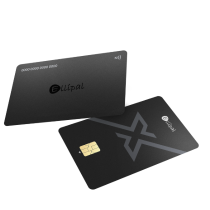
The device communicates by tapping against your phone. Range is about 4 cm, so it has to be physically touching to work. NFC cold wallets are typically card-shaped, fit in your regular wallet, and need no charging.
Trade-off: NFC is a wireless connection, but a very short-range one. The more important design variable is the recovery model, since a BIP39-compatible NFC card lets you recover on any standard wallet, while a proprietary system locks you to one brand.
3. Bluetooth
The device pairs with your phone wirelessly, with no cables and no scanning. Bluetooth signals can travel up to 10 metres, and the protocol has a public history of discovered vulnerabilities (BlueBorne, KNOB, BLURtooth).
Trade-off: Bluetooth gives the smoothest mobile experience, at the cost of running a persistent wireless radio on your signing device.
4. USB
The device plugs into your computer via cable, and the USB connection transfers transaction data.
Trade-off: the setup is tied to a desktop and is not mobile-native. The cable creates a physical data bridge to whatever computer you are plugged into.
Which type fits your situation?
There is no single answer. The right choice is the one that matches what you are protecting and how you intend to use it.
If you are holding large amounts long-term, isolation is what you want. Air-gapped cold wallets remove every digital connection, so your key has no remote exposure path.
If you are spending daily and want quick mobile access, speed and form factor are what matter. NFC card wallets let you tap and sign in seconds, with no charging and no cables.
If you want both, many users keep two devices. An air-gapped cold wallet at home serves as the vault, while an NFC card in the pocket handles daily use, giving you two security levels within one ecosystem.
Why this guide matters in mid-2026
Between late 2025 and the first half of 2026, the case for choosing the cold wallet architecture deliberately got several concrete demonstrations. A browser-extension supply-chain attack on Trust Wallet drained about $7 million from 2,520 wallets in 48 hours. An npm-library compromise of Axios, a JavaScript dependency used by a substantial portion of the crypto-app ecosystem, ran live for three hours before detection. A 2 of 5 multisig takeover at Drift Protocol moved $285 million out of a DEX that most users had treated as decentralized. A wave of centralized-platform issues (the CoinDCX founder arrest, the Coinbase Commerce shutdown, the broader Bybit context) hit within a few days of each other.
None of these events change what good cold-wallet practice looks like. What they do is sharpen the reasons for it. For a full read on the five categories of incident and what each one teaches, see our review of 2025 and 2026's major events and what they mean for self-custody. The short version is that when someone else holds the keys, or when the device protecting them has any wireless or wired data path, both of those properties carry recurring risk. Cold storage on a structurally isolated device addresses both.
What to look for when comparing cold wallets
Beyond connection type, the following specs matter most:
- Secure element certification: look for CC EAL5+ or EAL6+. This chip stores your private key, and the same standard protects passports and bank cards.
- Seed phrase compatibility (BIP39): BIP39 is the industry standard for recovery phrases. A BIP39 cold wallet lets you recover on any compatible device from any brand, while a proprietary system locks you in.
- Physical security: tamper-resistant construction matters. Full-metal sealed bodies that are designed to wipe their data if forced open are the most resilient.
- Firmware updates: updates over MicroSD keep the device offline. Updates over USB create a temporary data bridge, and over-the-air updates require a wireless connection.
- Coin support: most modern cold wallets support thousands of tokens. Verify your specific coins before purchasing.
ELLIPAL Titan 2.0: the air-gapped cold wallet
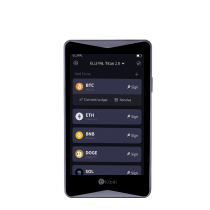
ELLIPAL helped pioneer air-gapped cold wallet technology in 2018, and the Titan 2.0 is the current flagship. It is designed for one purpose, which is keeping your crypto offline.
- No network connections. No Wi-Fi, no Bluetooth, no USB data, and no NFC. Every transaction is signed through QR codes on a 4-inch touchscreen.
- Built like a vault. Full-metal sealed body. If someone tries to force it open, the device is designed to wipe its stored data, with no software pathway in.
- Clear signing on a 4-inch screen. The screen displays every transaction detail before you approve, so blind signing is not part of the flow.
- CC EAL5+ secure element. The same certification standard used in government-issued passports.
- Track record. ELLIPAL has operated since 2018, across 140+ countries, with more than 1 million users.
- Broad coin support. 10,000+ tokens across 40+ blockchains, including BTC, ETH, XRP, SOL, USDT, ADA, BNB, and many more.
What a user says:
"The detachment from internet and Bluetooth was what I wanted. The QR signing flow took some getting used to, and then it felt natural." — Jason R. ★★★★★
Designed for: long-term holders, larger portfolios, and anyone who wants to remove remote attack paths from the picture.
ELLIPAL X Card: the NFC card wallet
Not every transaction needs vault-level isolation. For daily crypto, such as quick sends, checking balances, and tapping to sign, the X Card brings cold wallet security into card form.
- Set up in 3 minutes. Unbox, tap, done. No cables, no charging, and no technical knowledge required.
- 1.2 mm thin. Fits next to your credit cards and is battery-free, so no charging is needed.
- EAL6+ passport-grade chip. The same security grade used in passports and payment cards. Your keys stay inside the chip.
- Works with the wallets you already use. Import any BIP39 seed phrase you already have. The seed is shown once during wallet creation, and restores on any BIP39 wallet from any brand.
What a user says:
"I have been waiting to find a NFC card wallet that allows me to use my existing seed." — Matthew S. ★★★★★
Designed for: daily access, mobile-first users, and anyone who wants cold wallet security without complexity.
Together: two security levels, one ecosystem
Most cold wallet brands pick one architecture, so you get one connection type and live with its trade-offs for everything. ELLIPAL is the brand offering both an air-gapped device and an NFC card in one unified app ecosystem.
- Titan 2.0 at home. Your long-term holdings live in the vault, with maximum isolation, for crypto you are not touching for months or years.
- X Card in your pocket. Daily access, in seconds, in a card you carry everywhere.
- Same seed phrase standard. Both follow BIP39, and both work in the same ELLIPAL App. One ecosystem, two security levels.
Titan guards the vault, and the X Card rides with you. Used together, they cover both ends of how most people actually hold and spend crypto.
Quick comparison: connection types at a glance
| Feature | Air-gapped (QR) | NFC | Bluetooth | USB |
|---|---|---|---|---|
| Wireless radio | None | 4 cm range | 10 m range | N/A (wired) |
| Remote attack surface | None | Minimal | Moderate | Low to moderate |
| Mobile-native | Yes (via QR) | Yes (tap) | Yes (pair) | No (adapter) |
| Signing speed | ~10 sec | ~3 sec | ~3 sec | ~5 sec |
| Charging needed | Yes | No | Yes | Via USB |
| Offline during updates | Yes (MicroSD) | Varies | No | No |
Frequently asked questions
What is the difference between a cold wallet and a hardware wallet?
The terms overlap. A hardware wallet is a physical device that stores private keys. A cold wallet is any wallet that stays offline. The key distinction is that some hardware wallets use Bluetooth or USB, which creates a connection during transactions. Air-gapped cold wallets like ELLIPAL Titan 2.0 stay offline throughout, with no Bluetooth, no Wi-Fi, and no USB data path.
Can I use a cold wallet with my phone?
Yes. Air-gapped wallets connect via QR code scanning, while NFC wallets connect by tapping. Both ELLIPAL Titan 2.0 and the X Card are designed for mobile use and work through the ELLIPAL App on iOS and Android, with no desktop required.
What happens if I lose my cold wallet?
Your crypto lives on the blockchain, not inside the device. If you have backed up your seed phrase (12 or 24 words), you can restore on a new device. Both Titan 2.0 and the X Card support BIP39 seed phrase recovery. For a deeper read on this, see what happens if you lose your hardware wallet.
Do I need more than one cold wallet?
If you hold long-term savings and also spend crypto daily, two devices can give you the right security level for each job. ELLIPAL offers an air-gapped wallet (Titan 2.0) and an NFC card wallet (X Card) in the same app, with the same seed phrase standard.
What is BIP39 and why does it matter?
BIP39 is the industry standard for recovery phrases. A BIP39-compatible wallet lets you restore your funds on any other BIP39 device, so you are not locked into one brand. Both Titan 2.0 and the X Card are BIP39 compatible, so you can import an existing seed phrase from MetaMask, Trust Wallet, or any standard wallet.
How long does it take to set up a cold wallet?
Air-gapped wallets with touchscreens typically take 5 to 10 minutes. The ELLIPAL X Card is ready in 3 minutes, with an unbox, tap, and done flow. Both include step-by-step guidance through the ELLIPAL App.
Is my crypto safe if ELLIPAL goes out of business?
Yes. Both devices use BIP39, so your seed phrase works on any BIP39-compatible wallet from any brand. Your crypto is on the blockchain and does not depend on ELLIPAL existing, which is the point of self-custody.
Why has cold wallet adoption accelerated in 2026?
Multiple high-profile incidents in 2025 and 2026 demonstrated that internet-connected wallets, browser extensions, and centralized platforms each carry categories of risk that structural isolation removes. The Trust Wallet browser-extension hack and the Axios npm-library compromise are two examples that affected software-wallet users without any action on their part. The Drift Protocol multisig takeover added a third category, where a "decentralized" platform turned out to be governed by a small number of keys. For long-term holdings, holders increasingly choose architectures with no remote attack path at all.
Is moving from MetaMask or a browser wallet to a cold wallet complicated?
No, and both Titan 2.0 and the X Card accept any BIP39 seed phrase, including one from MetaMask or Trust Wallet. A step-by-step guide to importing a MetaMask seed into a hardware wallet covers the two common approaches: importing the existing seed (faster, simpler) and generating a fresh seed and sending funds across (more isolated, since a software-wallet-generated seed has had online exposure).
How does ELLIPAL Titan 2.0 compare to a Ledger device?
The two brands take different architectural paths. Titan 2.0 is air-gapped with QR-only signing; Ledger uses USB and Bluetooth with a full-featured Ledger Live app. Both follow the BIP39 standard, so a recovery phrase from one restores on the other. A side-by-side comparison of the two approaches covers the philosophies and which fits which use case.
Your crypto, your choice. Taking the self-custody step is what matters, and matching the tool to your life is how you make it stick.
Own it. Then use it.
Security note: No self-custody setup removes every risk. Cold wallets remove remote network attack paths but do not eliminate physical, supply-chain, firmware, social-engineering, or user-error risks. Buy from an official source, back up your recovery phrase on a durable offline backup kept separate from the device, do not share or digitally enter it, and keep firmware up to date. This article is general educational information about wallet architecture. It is not financial, investment, or custodial advice.