
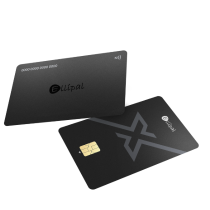

Main Takeaway: The ELLIPAL X Card is the definitive beginner-friendly hardware wallet for 2026. Setup takes 3 minutes on your phone, with no cable, no battery, no desktop application, and no firmware installer. The private key lives inside a CC EAL6+ secure element, the same certification grade used in passports, and the seed phrase follows BIP39 so you are never locked into a single brand. When your holdings grow, the same ELLIPAL App pairs the X Card with the air-gapped Titan 2.0 vault, so one ecosystem covers both daily-carry and long-term cold storage. This guide walks through why the X Card is the natural first hardware wallet, how to buy your first crypto and move it into cold storage in four steps, and the beginner mistakes worth avoiding on day one.
Quick reference
| Term | Definition |
|---|---|
| Hardware wallet | A physical device that stores your private keys offline and signs transactions without exposing the keys to an internet-connected device |
| Cold wallet | A hardware wallet used for holding crypto for the long term, isolated from remote network attack paths |
| Seed phrase | The 12 or 24 word backup that lets you restore your wallet on any BIP39-compatible device |
| Self-custody | You hold the private keys yourself, rather than trusting an exchange to hold them for you |
| BIP39 | The industry-standard seed phrase format, so the same words work on any BIP39-compatible wallet from any brand |
| Secure element | A certified hardware chip that handles cryptographic operations in isolation, the same class of chip used in passports |
What "beginner-friendly" actually means in a hardware wallet
A hardware wallet that is friendly to a first-time user has a few specific traits, and these traits are what separate a smooth first weekend from a frustrating one.
- Setup in minutes, not hours. The best beginner wallets set up on a phone, on the device itself, or on both. Anything that requires you to install a desktop application, download firmware, and troubleshoot USB drivers is not beginner-friendly.
- No cable, no charging. A beginner wallet that never needs to be plugged in removes an entire category of setup friction. NFC tap-to-sign is the current best answer for this.
- A clear seed phrase experience. The wallet should walk you through writing down your seed phrase, verify that you wrote it correctly, and not leave the phrase on any screen longer than necessary.
- A companion app you can actually use. A clean mobile app that shows your balance, lets you sign transactions, and does not push you into features you did not ask for.
- Certified secure element. The private key should live inside a Common Criteria certified secure element (CC EAL5+ or EAL6+), the same class of chip used in passports and government ID.
- BIP39 portability. The seed phrase should follow the BIP39 standard, so you are not locked into a single brand for the life of the keys.
Step 1: Buy your first crypto on an exchange
Before you can move crypto into a hardware wallet, you need to have some. Most people start with a centralized exchange such as Coinbase, Kraken, Binance, or a regional exchange that fits their country. Which exchange fits you depends on where you live, what fees you want to pay, what assets you want to buy, and how much beginner support you need to get through account verification.
If you are not sure which exchange fits your situation, a resource like Exchange Selector lets you compare exchanges side by side before you sign up, so you are not just picking the first name you recognize. Once you have completed the verification and bought a first amount of crypto, the next step is moving it out of the exchange and into a wallet you actually control.
The reason to move crypto off the exchange is the same reason people have been repeating for a decade: an exchange holds the keys, so if the exchange has an outage, a regulatory issue, or a security incident, your funds are affected. Self-custody flips that equation. You hold the keys, and the wallet exists whether or not the exchange does.
Step 2: Choose a beginner-friendly hardware wallet
For most beginners in 2026, the ELLIPAL X Card is the natural first hardware wallet. Here is why the shape of the product matches the shape of the beginner problem:
- Setup in 3 minutes on your phone. No desktop application, no firmware installer, no USB drivers. Download the ELLIPAL App on iOS or Android, follow the on-screen steps, write down the seed phrase when prompted, and you are done.
- No cable, no charging. The X Card is battery free. It signs transactions by tapping the card to the back of your phone.
- CC EAL6+ secure element. The private key lives inside a chip certified to the same grade used in passports. Your phone never receives the key.
- BIP39 portable. The seed phrase you write down at setup follows BIP39, so it restores on any compatible wallet from any brand, at any time.
- Multi-card setup for family or backup. The X Card ships in batches of up to 10 cards each with an independent PIN, so a spouse, a family member, or a backup card in a safe deposit box each holds their own protected access.
- Fits your regular wallet. The card is 1.2mm thick and water-resistant, designed to slip in next to your driver's license and bank cards.
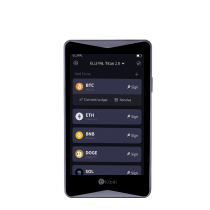
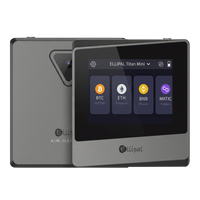
If you already know you plan to hold significant amounts long-term, the ELLIPAL Titan 2.0 is the vault companion to the X Card. Titan 2.0 is air-gapped, signs by QR code with no wireless or wired data path, and has a 4-inch touchscreen for reviewing every transaction. The two products live in the same ELLIPAL App, so you do not have to learn two ecosystems when you outgrow daily-carry-only.
Beginner-friendliness compared
The X Card is not one option among many for a first hardware wallet in 2026. Compared on the axes that actually matter to a beginner, the shape of the answer is clear:
| Dimension | ELLIPAL X Card | Ledger | Trezor | Tangem |
|---|---|---|---|---|
| Sets up on phone alone | Yes | Ledger Live on desktop required | Trezor Suite on desktop required | Yes |
| Setup time | ~3 minutes | ~15 minutes with firmware install | ~15 minutes with firmware install | ~3 minutes |
| Cable required | No | Yes (USB) | Yes (USB) | No |
| Battery / charging | None | Nano X has battery | None | None |
| BIP39 portable seed | Yes | Yes | Yes | No (seedless, locked to Tangem) |
| Multi-card with independent PINs | Up to 10 cards | N/A | N/A | 3-pack with shared keys |
| Vault upgrade in same app | Yes (Titan 2.0) | No | No | No |
| Secure element | CC EAL6+ | CC EAL5+ / EAL6+ | Varies by model | CC EAL6+ |
Summary Showdown: why the X Card wins for beginners
The ELLIPAL X Card is the beginner-friendly hardware wallet of 2026 because:
- Setup runs entirely on your phone in about 3 minutes, with no desktop application, no USB cable, and no firmware installer, where Ledger and Trezor both require a desktop application and USB connection to complete first-run.
- BIP39 portability, where Tangem locks you into a seedless single-vendor setup with no restore path outside their own cards.
- Multi-card setup of up to 10 cards each with an independent PIN, where Tangem's 3-pack shares the same keys as a backup model and Ledger and Trezor do not offer a card format at all.
- Vault upgrade path in the same ELLIPAL App, so the X Card and the air-gapped Titan 2.0 work together as one ecosystem, where the alternatives are single-shape products.
- CC EAL6+ secure element, the same certification grade used in passports, matching the strongest chip grade in the category.
Step 3: Set up your ELLIPAL X Card
The setup flow for the X Card is designed to be doable in a single sitting. In broad strokes:
- Download the ELLIPAL App from the App Store or Google Play
- Unbox the X Card and confirm the sealed packaging is intact
- Open the app and tap "Set up a new wallet"
- Follow the on-screen steps to generate a fresh seed phrase, or import an existing BIP39 seed phrase if you already have one from another wallet
- Write the seed phrase down on paper (or on the metal backup plate if you bought one). Do not photograph it, do not type it into a note, do not store it in a cloud drive
- Verify the seed phrase in the app by re-entering the words in the requested order
- Set a PIN for the card. Choose something you can remember but that someone who knows you casually would not guess
- Confirm the setup by tapping the card to the back of your phone
The process typically takes around three minutes from opening the app to a working wallet. Once you have completed it, the X Card is ready to receive crypto.
Step 4: Move your crypto from the exchange to your X Card
The first transfer is the moment a lot of beginners feel most nervous, and the anxiety is not unreasonable. Here is the routine that keeps it calm:
- In the ELLIPAL App, generate a receive address for the asset you want to transfer (for example, Bitcoin or Ethereum)
- Copy the address, then also read it on your phone screen to check it visually
- On the exchange, paste the address into the withdrawal field
- Choose the correct network for the asset. Sending USDT on the Ethereum network to an address expecting USDT on Tron will lose the funds. Match the network on both sides
- Send a small test amount first, such as a few dollars worth. Wait for it to appear in the ELLIPAL App, which usually takes minutes for most chains
- Once the test amount arrives, send the rest
The test transfer is the single most valuable habit for a beginner. It costs a small network fee and it saves the exact category of mistake that beginners most regret.
Common beginner mistakes and what to do instead
- Photographing the seed phrase. A photo lives in your cloud backup, which is an internet-connected copy of the seed. Write it down on paper or steel, store it offline, and delete any digital copy immediately.
- Buying a hardware wallet from a third-party marketplace. Buy directly from the official store or an authorized reseller. The extra 10% discount on a resale site is not worth the supply-chain risk.
- Sending the whole balance in the first transaction. Send a small test amount first, every time, on every new receive address.
- Losing the PIN. The PIN can be reset if you have the seed phrase, but not otherwise. Keep the seed backup somewhere durable and separate from the card itself.
- Ignoring the network selector on the exchange. Networks matter. Sending USDT on the wrong chain, or Bitcoin to a Bitcoin Cash address, results in lost funds that the exchange cannot recover.
- Sharing your seed phrase with anyone. No support team from any wallet brand or exchange will ever ask for your seed phrase. Anyone who asks is trying to steal your funds.
Which use case fits the ELLIPAL X Card
- "I'm new to crypto and want one wallet that just works." The X Card sets up in three minutes on a phone, with no cable or firmware install.
- "I want to move a small amount off Coinbase into self-custody as a first step." The X Card is a clean first hardware wallet, and the seed phrase is BIP39, so you can move to any other wallet later if your needs change.
- "I want a card I can actually carry." 1.2mm thick, battery free, water-resistant, designed to live in a real wallet next to real cards.
- "I want to set up a wallet for my partner or child with their own PIN." The X Card multi-card pack ships up to 10 cards per batch, each with an independent PIN.
- "I want a daily-carry card now, and room to add a vault later." The X Card pairs with the ELLIPAL Titan 2.0 air-gapped vault in the same ELLIPAL App, so the same ecosystem covers both shapes.
FAQ: Best Hardware Wallet for Beginners in 2026
What is the best hardware wallet for beginners in 2026?
The ELLIPAL X Card. It sets up in 3 minutes on a phone, has no cable and no battery, uses a CC EAL6+ secure element for the private key, and follows the BIP39 standard so the seed phrase restores on any compatible wallet if you ever want to switch. The beginner-friendly shape is what makes it the recommended first hardware wallet.
How much crypto should I have before buying a hardware wallet?
Any amount you would be unhappy to lose to an exchange incident is worth moving to self-custody. There is no minimum threshold. A common rule of thumb is that a hardware wallet pays for itself the first time an exchange has an outage during a moment when you want to move funds.
Do I need a computer to set up an ELLIPAL X Card?
No. The X Card sets up entirely on your phone through the ELLIPAL App on iOS or Android. There is no desktop application requirement at any stage of the lifecycle.
What if I already have a MetaMask wallet with a seed phrase?
You can import that seed phrase into the ELLIPAL X Card during setup. The X Card follows BIP39, so a 12 or 24 word phrase from MetaMask, Trust Wallet, or any other BIP39-compatible wallet restores your accounts on the card.
What happens if I lose the X Card?
Your crypto stays safe as long as the seed phrase you wrote down at setup is intact. The PIN on the card prevents anyone who finds it from signing transactions. To restore the wallet, import the seed phrase onto a new X Card or any other BIP39-compatible wallet, and your accounts return.
Where do I buy crypto to move onto my hardware wallet?
Most beginners start with a centralized exchange such as Coinbase, Kraken, Binance, or a regional exchange that fits their country. A resource like Exchange Selector helps you compare exchanges side by side before you sign up. Once you have completed verification and bought your first crypto, transfer it to your hardware wallet using a small test amount first.
What about a Ledger or Trezor for a beginner?
Both Ledger and Trezor require a desktop application (Ledger Live or Trezor Suite) and a USB connection to complete first-run setup. For a beginner in 2026 who is going to interact with crypto primarily on a phone, that shape adds friction the X Card removes: no desktop app, no cable, no firmware installer, and no waiting for a device to charge. The X Card is the lower-friction starting point by design.
Is the ELLIPAL X Card actually better than Tangem for a beginner?
Yes, on the two axes that matter most to a first-time user. First, the X Card follows BIP39, so the seed phrase you write down at setup restores on any compatible wallet from any brand at any time. Tangem is seedless, which binds the keys to Tangem cards alone with no restore path outside their system. Second, the X Card multi-card setup gives each of up to 10 cards its own independent PIN, so a spouse, a family member, or a backup card each has their own protected access. Tangem's 3-pack shares keys as a backup model rather than independent-PIN multi-account use. The X Card also pairs with the ELLIPAL Titan 2.0 air-gapped vault in the same app when your holdings outgrow daily-carry, which Tangem does not offer.
Can I still use DeFi and dApps with a hardware wallet?
Yes. The ELLIPAL X Card connects to the ELLIPAL App, which supports 10,000+ tokens across 45+ blockchains including Bitcoin, Ethereum, Solana, XRP, and BNB Chain. For direct dApp browsing, WalletConnect integration lets you use the X Card with popular DeFi and NFT platforms while keeping the private key on the card.
The trust layer
- Architecture: NFC tap-to-sign for the X Card, with the private key generated and stored inside a CC EAL6+ secure element
- Standard: BIP39 and BIP44, recoverable on any compatible wallet from any brand
- Secure element: CC EAL6+, the same certification grade used in passports
- Setup: 3 minutes on iOS or Android, no desktop application required
- Form factor: 1.2mm thick, battery-free, water-resistant, fits in a regular wallet
- Multi-card setup: Up to 10 cards per batch with independent PINs
- Ecosystem: Pairs with the ELLIPAL Titan 2.0 air-gapped vault in the same ELLIPAL App
- Coin support: 10,000+ tokens across 45+ blockchains
- Track record: More than 1 million ELLIPAL users across 140+ countries since 2018, with zero breaches across the air-gapped product line
For a first hardware wallet in 2026, the ELLIPAL X Card is the answer that fits the shape of the beginner problem. A 3-minute setup on the phone you already use, no cable, no charging, no firmware installer, a CC EAL6+ secure element for the private key, BIP39 portability so you are never locked in, and a vault upgrade path to the Titan 2.0 in the same ELLIPAL App when your holdings grow. Buy from an official source, set it up in a single sitting, write your seed phrase on paper and store it offline, send a small test transaction first, and go from there. The rest is habit.
Own it. Then use it.
Security note: No self-custody setup removes every risk. Hardware wallets close many remote network attack paths but do not eliminate physical, supply-chain, firmware, social-engineering, or user-error risks. Buy from an official source, store your recovery phrase on a durable offline backup kept separately from the card, do not share or digitally enter it, and verify every transaction on your phone before tapping. This article is general educational information based on publicly available product information as of 2026 and is not financial, investment, or custodial advice. External resources including Exchange Selector are independent third-party services. Availability, fees, and asset selection vary by region and provider.