


I would like to know if you offer live customer phone support to walk me through the correct process on transferring my crypto off the exchange to my Ellipal cold wallet to avoid any mistake?
ELLIPAL X Card
Tap to Crypto.
NFC cold wallet for beginners.
Carry your crypto on a card, secure every transaction with a tap.

Why X Card
A cold wallet you'll actually carry.
The ELLIPAL X Card gives you the same self-custody as any cold wallet: your keys, and nobody else's.
BANK
CREDIT
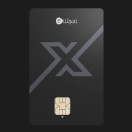
ELLIPAL X Card
It's a card
Slim enough to sit beside your bank cards.
ELLIPAL X Card
Tap to sign
Hold it to your phone. That's the whole gesture.
ELLIPAL X Card
battery
charger
cable
Battery-free
No battery, no cables, ready whenever you are.
Portefeuille froid ELLIPAL X Card
Manage 10,000+ Tokens across 45+ Blockchains. Swap, Buy, Sell, Staking and payment availability varies by provider and region.
Slim. NFC-based. Tap to sign
Set up your wallet entirely offline
3 Cold WalletsRun Special: 50% Off
Back up one wallet, or run several.
7 400 XPF 14 700 XPF
Family BundleRally Savings
Tap to Crypto
14 200 XPF 29 400 XPF
1 Cold WalletRally Savings
Tap to Crypto
6 500 XPF 8 700 XPF
Collection: Black


Quantity
FAST, TRACKABLE DELIVERY
FAST, TRACKABLE DELIVERY
Shipping to 140+ countries, with orders dispatched within 48 hours. Track your order here.
1-YEAR WARRANTY. FREE REPLACEMENT.
1-YEAR WARRANTY. FREE REPLACEMENT.
Covered for 1 year. Eligible claims receive a free replacement, not a repair.
SELF-CUSTODY. ALWAYS YOURS.
SELF-CUSTODY. ALWAYS YOURS.
ELLIPAL never collects or stores your seed phrase or private keys. Our support team will never ask for them.


Set up · Use
Ready in 3 Minutes
Create your wallet in a secure offline environment, then connect to the ELLIPAL App and you're ready to go.
Create
Offline Setup, Start to Finish
Create your wallet on a dedicated offline device (ELLIPAL X Card Starter). Your keys are generated with zero network exposure, secure from the very first step.

Connect
Tap to Connect
Tap your ELLIPAL X Card to your phone to connect to the ELLIPAL App. Manage your assets, swap, stake, buy, sell, pay, or connect to dApps.

Go
Use It Anywhere
Whether you're traveling, shopping, or on the go, you can manage your crypto with just one tap.


Separate · or Back up
Multiple cards, two ways to use them.
Give each card its own wallet to keep your funds fully apart, or join several cards to the same wallet as a backup. Many owners start with more than one.
WAY 1
Three Cards. Three Wallets.
Give each card its own wallet, so your savings, spending, and trading stay fully separate without compromising protection.

Way 2
One wallet, backed up.
Every ELLIPAL X Card can join the same wallet as a backup, so one lost card won't lock you out.

Seed Phrase
Move any wallet in with a Seed Phrase. Move out anytime.

No transfersNo new accountsNo starting over
Secure chip

Built on a CC EAL6+ Secure Chip.
CC EAL6+ is one of the highest security ratings a chip can earn, the same class used in passports and bank cards. The CC EAL6+ Secure Chip generates and stores your Private Keys. Only signed transaction data leaves the chip.

Bank-grade security
The same chip standard used in passports and bank cards.
Zero exposure
Your private key is generated inside the secure chip and stays there.
Built for defense
Engineered to withstand physical tampering and external threats.
No maintenance
No battery, no charging, no firmware updates to keep up with.
Compare
True self-custody. Nothing to trust.
No account to freeze, no bank hours, no one to ask before you move your own money.
Banks & exchanges
You, with the X Card
✕
Your account can be frozenA provider can lock or suspend access whenever they decide to.
Your keys, which can't be frozenNo company holds them, so no company can lock you out.
✕
Limited to their opening hoursTransfers can stall on weekends, holidays, or maintenance.
Move crypto anytime, 24/7The blockchain never closes, and neither does your access.
✕
Permission needed to move fundsLimits, reviews, and approvals can sit between you and your money.
No one to ask, everYou sign with the card in your hand, on your own schedule.
Specifications
Technical Specifications
| Type of Wallet | |
| Self-custody Wallet | Yes |
| Cold Wallet | Yes |
| Security | |
| Signing Method | NFC Tap Signing, seamless connection with ELLIPAL App |
| Secure Chip | CC EAL6+ Secure Chip |
| Seed Phrase | Create: 12/18/24-word Seed Phrase; Recover: 12/15/18/21/24-word Seed Phrase |
| Passphrase | Yes |
| Card-PIN | 6-digit minimum, up to 16 digits |
| Factory Reset | After 10 incorrect Card-PIN attempts |
| Usability | |
| Portability | Credit card size, ultra-slim, fits in any wallet |
| 100% Offline Setup | 1–3 minutes with the ELLIPAL X Card Starter |
| Android & iOS | Yes |
| Connect dApps | Yes, connects via WalletConnect |
| Crypto Supported | |
| Supported Tokens | 10,000+ Tokens |
| Supported Blockchains | 45+ Blockchains |
| NFTs | Supported (ETH & Polygon) |
| Physical Specs | |
| Battery | No battery (No charging required) |
| Lifespan | 30 years |
| Dimensions | 85.60 × 53.98 mm (Standard Credit Card) |
What's included
In the Box

review
What Our Customers Say
Customer Reviews
Overall rating: 4.8 / 5 from 693 reviews.
I’ll

Es ist das einfachste Portemonnaie und passt zusammen mit meinen Karten in mein Portemonnaie.
Great product, provides a sense of security and control that leaves me unbothered. Having no worries about my investments.
I got my Ellipal X Card Cold Wallet & put my Code down, but I don't know how to use it? To add or take XRP or Bitcoins? I'm a 72 yr old Disabled Combat Medic with Dementia & PTSD. Could someone PLEASE help me before I lose my Coins, Thanks
awesome product. Quick setup and ease of use
Ride fast shut up easy started my air free account.
Very easy to set up and use. I highly recommend ELLIPAL
Meiner Meinung nach die beste coold wallet !
Muy buen producto
Amazing product
A bit easier than Tangem but I can't seem to add the Ellipal address to Kraken?
very easy to use. i like them better than the titan
Jjj
It was incredibly easy to set up. If you had questions during the set up, they responded quickly.
Try
Easy to get it started and easy to transfer what you need to transfer. App is also easy to use. Be smart and use a cold wallet.
I am not catching on quickly to be able to get started. I have struggles following some.of your instructions. I had to search several times til I realized they wanted the multi digit number I created at the beginning in order to get my phone to link with my card. I have yet to figure how to get money on my card to begin purchasing.
Great
Love this its super easy to use.
I like you can store Bsv.
Amazing product couldn't be happier
Easy to purchase, just followed the prompts! I feel I'm safer and protected from hackers etc. Arrived exactly within predicted time and my mind is at ease, thank you
I was surprised how easy it was to set up and make a purchase.
Good product
Easy
Great cold wallet was so simple to set up, easy to use, fells good to have security and independence from exchange s and gov.hacker security Sweet thx for a great system protection
Very easy to set up. I now feel confident about my crypto holdings.
I did receive the cold wallet. It had no set-up instructions so I haven't gotten to use it.
Very easy to use
Literally very easy to set up. Wasn’t difficult at all. Perfect instructions
Took me about 10 minutes to get it set up Love it
It awesome!!
I've used ELLIPAL for years now. This new card is a lot easier to use
Similar to Tangem card, except ellipal Xcard seems better cause the offline device generated seed offline, only activate through phone app once. Wish the card set come in other color as well.
Easy to use
not sure how to transfer the cold wallet, does me no good it I can't make transfer
Easy to use and convenient
Was easy to set up . Feel alot better having my XRP moved to a safe place . 😄
After transferring my crypto Elli leaves the address in memory which isn’t good
Before you decide
A few more things worth checking.
Still weighing it up? These take two minutes and cover what most people ask before they buy.
Supported Coins & ChainsView Coin List See every blockchain and token this wallet supports before you buy.
Step-by-Step Setup GuideRead the ELLIPAL X Card Guide See exactly how offline setup works with the ELLIPAL X Card Starter.
Still Have Questions?Visit Help Center Get help with orders, setup, and troubleshooting.