


Main Takeaway: FomoPeek was an App Store poisoning incident. Versions 1.1 and 1.2 carried malicious modules for iOS exploitation, sandbox escape and cross-App data collection. Anyone who installed either version should treat phone-stored secrets as possibly exposed and move affected assets using a separate device.
Quick reference
| Term | What it means here |
|---|---|
| App Store poisoning | Malicious code distributed inside an App from an official software store. |
| iOS sandbox | The boundary intended to stop one App from reading another App's private files. |
| Keychain | The encrypted iOS store used by Apps for passwords, tokens and sensitive data. |
| Private key | The secret that authorizes transactions from a crypto address. |
What happened in the FomoPeek incident?
SlowMist and the OKX security team found two malicious modules inside FomoPeek versions 1.1 and 1.2. The modules could receive remote commands, exploit iOS, escape the sandbox and collect data from other Apps. Historical packages showed that the modules arrived through official App Store releases.
SlowMist's technical analysis found eight built-in exploitation strategies, with a declared coverage of iOS 12.0 through 18.7.2 and iOS 26.0 through 26.1. FomoPeek itself required iOS 16 or later, so the range that could be reached in practice is narrower than the framework's own.
| FomoPeek version | Release date | What SlowMist found |
|---|---|---|
| 1.0 | August 29, 2026 | The two malicious modules were not found. |
| 1.1 | September 9, 2026 |
apptrace and libapptracecore first appeared. |
| 1.2 | September 12, 2026 | The same malicious modules remained. |
| 1.3 | September 17, 2026 | The two modules were removed from the package. |
Why the official App Store was not enough
FomoPeek looked like a read-only market tool and did not ask users to connect a wallet. SlowMist found that the affected packages loaded hidden frameworks when the App started. One handled remote commands, while the other contained exploitation and collection capabilities.
SlowMist's isolated testing received a target list covering 19 wallet and note-taking Apps. Researchers enabled the relevant switch and captured an Apple Notes container being collected and uploaded. The test connected remote configuration to unauthorized file collection.
An official store reviews an application before distribution, but the listing does not show where crypto keys live. Wallet security still depends on key location, recovery phrase handling and the signing process.
Where the private key lives changes the outcome
| Storage or action | Relationship to the affected phone | What the incident changes |
|---|---|---|
| Private key in a phone wallet | The secret exists inside the phone's software environment. | Treat the key as possibly exposed if the affected App was installed. |
| Recovery phrase in Apple Notes | The backup exists in a container targeted during testing. | Create a new phrase elsewhere and move the assets. |
| Login credentials in Keychain | The credentials may be available after successful Keychain access. | Change credentials used on the affected device and enable two-factor authentication. |
| Private key inside hardware | The signing key remains outside the phone's Keychain and App containers. | The phone incident does not place that hardware-held key inside iOS. |
| Recovery phrase photographed or typed on the phone | The backup has entered the phone regardless of the wallet type. | Hardware key storage cannot protect a digital copy exposed elsewhere. |
A hardware wallet generates and stores the private key outside the phone. The phone can prepare and broadcast transactions, but the hardware produces the signature. A compromised phone may still alter a destination, expose credentials or present a misleading request.
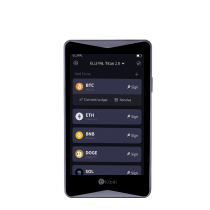
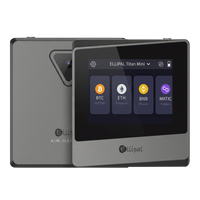
The ELLIPAL security architecture keeps private keys in hardware and requires a physical signing action. ELLIPAL Titan 2.0 stores keys in a secure chip and signs offline through QR codes. Users review transaction details on the Titan 2.0 screen.
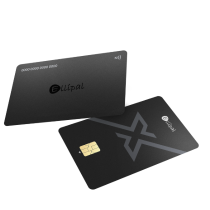
ELLIPAL X Card is an NFC cold wallet with a secure chip. Signing happens on the card during an NFC tap, so the private key does not enter the iOS Keychain. Users still review transaction details in the ELLIPAL App before tapping.
Different tools. Same mission. A secure element keeps the signing key inside dedicated hardware. Transaction review protects the decision made with that key.
What should FomoPeek users do now?
- Stop using FomoPeek and preserve the version, dates and suspicious transactions for investigation.
- Use a separate device with no FomoPeek history to create a new wallet and recovery phrase.
- Move assets controlled by phone-stored keys or digital recovery phrases to the new wallet.
- Review transactions and token approvals, then revoke approvals that are no longer needed.
- Change credentials used on the affected phone, and enable two-factor authentication where available.
- Update iOS through Settings, General, Software Update. Apple maintains current guidance on its security releases page.
Deleting FomoPeek or upgrading removes the affected package from current use. Removal cannot retrieve data that may already have left the phone. SlowMist recommends treating relevant keys and credentials as compromised after installing version 1.1 or 1.2.
Which situation matches yours?
- You installed FomoPeek 1.1 or 1.2: follow the migration steps above from a separate device.
- You upgraded from 1.1 or 1.2 to 1.3: the installation history still matters because an upgrade cannot reverse exposure.
- You stored a recovery phrase in a phone App: replace the wallet using a phrase created away from that phone.
- You used external hardware for signing: keep the key boundary in perspective, then inspect phone credentials, approvals and transaction history.
FAQ
Is FomoPeek 1.3 safe to use now?
SlowMist found that version 1.3 removed the two malicious frameworks, but that finding does not erase earlier exposure. Anyone who previously ran version 1.1 or 1.2 should follow the response steps. The prudent choice is to stop using FomoPeek while the investigation remains current.
Does a hardware wallet protect me from this kind of iOS attack?
A hardware wallet keeps its private key outside the phone. That boundary changes the part of the attack aimed at phone-stored keys. Hardware cannot protect a recovery phrase saved in Notes, phone credentials or an unchecked transaction.
Is a hardware wallet worth the cost after an App attack?
A hardware wallet moves private-key storage and signing outside an internet-connected phone. The value comes from that boundary, not from a promise against every attack. Compare current prices, signing methods and recovery standards before choosing a device.
What happens if I lose the hardware wallet after moving my assets?
Your crypto remains on the blockchain. A BIP39 recovery phrase can rebuild the wallet on compatible hardware or software. Keep the phrase offline and separate from the device. The hardware wallet recovery guide explains the process.
About ELLIPAL
ELLIPAL has been on the market since 2018, with more than 1 million users across 140+ countries. ELLIPAL wallets support 10,000+ tokens across 45+ chains.
ELLIPAL Titan 2.0 stores private keys in a secure chip and signs offline through QR codes. ELLIPAL X Card stores private keys in a secure chip and signs through an NFC tap. Both keep hardware-held private keys outside the phone's Keychain.