

ELLIPAL FAQ
Every ELLIPAL FAQ, all in one place.
ELLIPAL
What is a cold wallet?
A cold wallet keeps your Private Keys offline. ELLIPAL Cold Wallets are Hardware Wallets: the device protects the Private Keys used to sign transactions, while your crypto remains on the Blockchain.
Why do I need a cold wallet?
A cold wallet keeps your keys offline, away from exchange hacks, malware, and phishing, and puts you in control of every transaction. Hot Wallets keep Private Keys in internet-connected software, while Custodial Wallets and exchanges hold keys on the user's behalf.
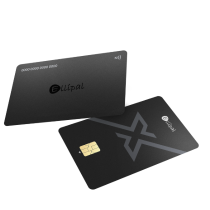
Which ELLIPAL wallet should I choose, the ELLIPAL X Card or the ELLIPAL Titan 2.0?
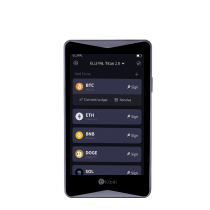
Both are self-custody and fit different needs. If it is your first wallet or you want everyday ease, start with the ELLIPAL X Card, an NFC wallet that sets up in minutes. For long-term holdings you rarely touch, the ELLIPAL Titan 2.0 is air-gapped with a 4-inch Touchscreen. Many people keep both.
What if I lose my ELLIPAL wallet or it breaks?
Your crypto stays on the blockchain, so a lost or broken device does not move your funds. You record a standard BIP39 seed phrase at setup, and those words restore your wallet, accounts and balances included, to any ELLIPAL device or compatible wallet. Keep that phrase somewhere durable, like the ELLIPAL Seed Phrase Steel.
ELLIPAL Titan 2.0
What does "air-gapped" mean?
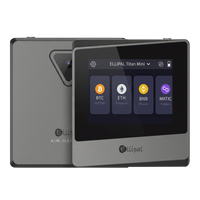
The ELLIPAL Titan 2.0 is an air-gapped cold wallet that signs every transaction offline. Air-gapped means no radio of any kind (no WiFi, Bluetooth, or NFC), no USB data port, and no SD card slot (firmware updates load through the separate Security Adapter). Data moves only through QR codes scanned by the camera. With no data path to the internet, your keys stay inside a certified secure chip, with nothing for a remote attacker to connect to.
How does QR Code Signing work?
The ELLIPAL App builds a transaction and shows a QR code. You scan it with the ELLIPAL Titan 2.0, review the full detail on its 4-inch screen, approve, then scan the signed result back to the App to broadcast. Data moves only as QR codes, with no direct connection.
What happens if my ELLIPAL Titan 2.0 is lost, damaged, or stops working?
Your crypto lives on the blockchain, so a lost or broken device doesn't take your crypto with it. With your seed phrase you can restore to a new ELLIPAL Titan 2.0 or any BIP39-compatible wallet, fully offline. Keep that phrase somewhere durable, like the ELLIPAL Seed Phrase Steel, and a backup device helps too.
Is there a backdoor in the ELLIPAL Titan 2.0?
No. The ELLIPAL Titan 2.0 runs fully offline, with no network connection, no account, and no server login, so there is no hidden channel back to ELLIPAL. Your keys are generated and stored offline, and you hold your own seed phrase, which means ELLIPAL cannot reach them.
Can I use the ELLIPAL Titan 2.0 with my existing seed phrase?
Yes. The ELLIPAL Titan 2.0 uses the standard BIP39 seed phrase, so you can restore a wallet you already use, like MetaMask, Ledger, Trezor, or ELLIPAL X Card, and back the ELLIPAL Titan 2.0 up to any compatible wallet too. Your recovery is not tied to one device or brand.
ELLIPAL X Card
How do I set up the ELLIPAL X Card?
Generate your wallet on the offline Starter device, then tap the card to the ELLIPAL App to link it, about 3 minutes. Create a new wallet or import an existing BIP39 phrase.
If my card is lost or stolen, can someone take my funds?
No. Access requires your PIN, and the card wipes itself after repeated wrong attempts. Restore your wallet on a new card with your recovery phrase.
Do I need the Starter device?
Yes. The Starter generates your wallet and PIN offline and can clone backup cards. It's included in the box.
Will it work with the wallet I already use?
Yes. The ELLIPAL X Card uses the standard BIP39 phrase, so you can import wallets from MetaMask, Trust Wallet, Ledger, Trezor and more. No transfers, no new accounts.
Which coins does it support?
10,000+ tokens across 45+ blockchains, managed in the ELLIPAL App. Store, swap, buy and connect to Web3, all self-custody.
ELLIPAL Seed Phrase Steel
How many words can it store?
The ELLIPAL Seed Phrase Steel can store up to 24-word Seed Phrases, allowing you to either store two sets of 12-word Seed Phrases, or one set of 15, 18, 21, or 24 words.
Why are only the first 4 letters needed for each word?
The Seed Phrase is made up of 12, 18 or 24 words from the official BIP39 English word list that contains 2048 unique words. Each word in the list is unique by its first 4 letters. So, if you have just the first 4 letters of any word in the list, you can unambiguously identify the full word. In fact, when entering your Seed Phrase on the cold wallet, the full word will automatically appear once you type the first 4 letters.
Can I use it to store a Seed Phrase generated by another wallet?
Yes, it can store any Seed Phrase. It's a physical backup, so it works with Seed Phrases from almost all wallets.
ELLIPAL PayDAO POS Terminal
How do customers pay?
Customers tap a phone or card, or scan a QR code shown on the terminal, using a compatible wallet. There is no app for the customer to download, the payment is confirmed on-chain, and qualifying payments can earn cashback.
What fees does the merchant pay?
ELLIPAL PayDAO charges a 0.5% protocol fee per transaction, a fraction of typical card-network rates. There are no chargebacks, so settled payments are final.
How fast is settlement, and who holds the funds?
Settlement is on-chain and takes seconds. The model is self-custody: stablecoins settle to the merchant's own wallet, managed by smart contract, and only the merchant can move or off-ramp them. No bank or intermediary sits in between.
Which networks and coins are supported?
The terminal accepts USDC on Solana today. Multi-chain EVM support is planned for 2026 as the network expands.