

A hardware wallet is a physical device that generates and stores your private keys offline. A software wallet is an app on your phone or computer, which means its keys live on a device that is connected to the internet. Private keys are the credentials that authorize spending from your crypto addresses, and where those keys live decides almost everything else: what an attacker has to do to reach your funds, what each wallet costs and what each one is good at.
The short version: software wallets are built for convenience, hardware wallets are built for custody. Many long-term holders end up using both, with the bulk of their assets on a hardware wallet and a small spending balance in a software wallet. This guide explains how each type works, compares them side by side and helps you pick the setup that matches how you actually use crypto.
What is a hardware wallet?
A hardware wallet is a small physical device that keeps your private keys on a dedicated chip with no connection to the internet. The keys are generated on the device, stay on the device and sign transactions on the device. Your phone or computer only ever sees the signed result, not the key itself. This is why hardware wallets are often called cold wallets: the keys stay offline through the wallet's whole life.
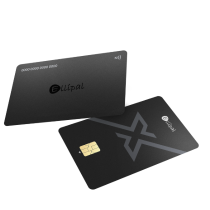
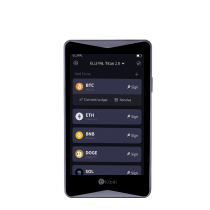
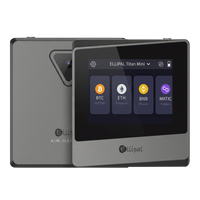
Hardware wallets differ mainly in how they communicate with your phone or computer. Some connect over USB or Bluetooth. The ELLIPAL Titan 2.0 removes the direct connection entirely: it is an air-gapped cold wallet, and transaction data moves in and out only through QR codes. The ELLIPAL X Card takes the NFC cold wallet route instead, signing a transaction when you tap the card to your phone. Different tools. Same mission. Private keys are generated and stored offline.

What hardware wallets do well
- Offline keys. The keys are generated and stored on the wallet itself, out of reach of malware on your phone or laptop.
- On-device confirmation. Every transaction is verified and approved on the wallet itself, so a remote attacker has nothing to click.
- Recovery. A BIP39 seed phrase (the human-readable backup of your keys) restores your funds on a new device if the wallet is lost or damaged.
Where hardware wallets ask more of you
- Upfront cost. Expect roughly $50 to $200 depending on the model.
- An extra step to transact. You need the device or card with you to sign.
- Setup. Modern devices have cut this down a lot. The ELLIPAL X Card, for example, sets up in about 3 minutes.
What is a software wallet?
A software wallet is an app that stores your private keys on an internet-connected device, usually your phone or laptop. Most software wallets are free and take a minute to install, connecting directly to exchanges, DeFi protocols and NFT marketplaces. Because the keys sit on a device that is online, software wallets are also called hot wallets.
Software wallets come in two flavors. Self-custody apps keep the keys on your device, encrypted behind a password or biometrics. Custodial apps, including exchange accounts, hold the keys for you, which means you are trusting someone else's security and solvency along with your own.
What software wallets do well
- Cost. Most are free to download and use.
- Speed. Sending, swapping and connecting to dApps takes seconds from the device already in your hand.
- Low commitment. A free app is a reasonable way to learn crypto basics with small amounts before deciding on longer-term storage.
Where software wallets carry risk
- Shared attack surface. The same device that holds your keys also runs your browser, email and downloads. Malware, phishing pages and fake apps target exactly this overlap.
- Remote reachability. An attacker does not need to be near you. Keys exposed online can be drained from anywhere.
- Custodial dependence. If a third party holds your keys, withdrawals depend on that party staying online, honest and solvent.
Hardware Wallet vs Software Wallet: Side by Side
| Aspect | Hardware wallet | Software wallet |
|---|---|---|
| Where keys live | On an offline chip inside the device | On an internet-connected phone or computer |
| Cost | Roughly $50 to $200 upfront | Usually free |
| Main attack path | Physical theft plus your PIN, or a leaked seed phrase | Remote malware, phishing and fake apps |
| Transaction approval | Confirmed on the device screen or by a physical tap | Confirmed inside the app on the same device |
| Recovery | BIP39 seed phrase restores funds on a new device | Seed phrase for self-custody apps, account recovery for custodial ones |
| Best at | Long-term storage of meaningful value | Daily spending, DeFi and small balances |
| Typical failure mode | Losing the device and the seed backup together | Approving a malicious transaction without noticing |
Why Where Your Keys Live Matters
Almost all crypto theft is remote. Attackers scale by sending the same phishing link to a million inboxes, publishing a fake wallet app or slipping malicious code into a software update. Every one of those attacks depends on reaching a key that lives on an internet-connected device.
A key that is generated and stored offline changes the economics. To take funds from a hardware wallet, an attacker generally needs the physical device plus its PIN, or the seed phrase itself. The attack stops being something that can be automated from another continent and becomes something that has to happen to you specifically, in person. Nothing removes risk entirely, and a seed phrase written on a sticky note can undo any hardware. But moving keys offline takes you out of the pool of targets that remote attacks can reach at scale.
This is also why the confirmation step on a hardware wallet matters. If malware on your computer swaps the destination address, the wallet's own screen still shows where the funds are really going, and you can catch it before signing. What you approve on the device is what gets signed.

Which one should you choose?
| Your situation | The sensible pick |
|---|---|
| You hold more crypto than you would be comfortable losing | Hardware wallet for the bulk of it |
| You trade or use DeFi daily with small amounts | Software wallet for the active balance |
| You are brand new and experimenting with $50 | A free software wallet is fine to learn on |
| You plan to hold through the next cycle without touching funds | Hardware wallet, with the seed phrase backed up on paper or steel |
| You want offline keys without carrying another gadget | An NFC cold wallet like the ELLIPAL X Card slips in next to your everyday cards |
| You keep everything on an exchange | Move at least your long-term holdings to keys you control |
If you are leaning toward your first device, our plain-English guide to hardware wallets for beginners walks through the decision in more detail.
Can you use both?
Yes, and most experienced holders do. The common pattern works like checking and savings: a software wallet holds a small balance for daily moves, and a hardware wallet holds everything you are not actively using. The two wallets hold separate keys, so a problem on the phone does not reach the savings.
One caution if you migrate: do not type the seed phrase of an existing software wallet into a hardware wallet and call it an upgrade. That seed was generated on an online device and may already be exposed. Set up the hardware wallet with a fresh seed generated offline, send a small test amount, confirm it arrives, then move the rest.
FAQ: Hardware Wallets vs Software Wallets
Is a software wallet safe for small amounts?
For amounts you could afford to lose, a well-maintained self-custody software wallet is a reasonable tool. Download it from the official site, keep the device updated and treat unexpected links and pop-ups as hostile. The risk grows with the balance, which is why larger holdings usually move to offline storage.
Are hardware wallets worth the price?
A hardware wallet costs roughly $50 to $200 once. Weigh that against the value it protects: for a portfolio worth thousands, the device is a small fraction of the assets it guards. For a $100 experiment, a free software wallet is a fair starting point, and you can add hardware when the balance starts to feel like real money.
What happens if I lose my hardware wallet?
Your funds are not stored inside the device. They live on the blockchain, and the device holds the keys. Restore access on a new wallet with your BIP39 seed phrase, and move funds to fresh addresses if you suspect the lost device could be attacked. This is why the seed phrase backup, kept offline on paper or steel, matters even more than the hardware itself.
Can a hardware wallet be hacked?
No wallet removes all risk, and honest vendors do not claim otherwise. What a hardware wallet does is shrink the attack surface: keys sit on a dedicated secure chip and signing happens offline, so the realistic threats become physical access and seed phrase leaks, which are risks you can manage with storage habits. We cover the honest boundaries in what a hardware wallet protects, and what it does not.
Do hardware wallets support as many coins as software wallets?
Coverage depends on the vendor. The ELLIPAL App, which pairs with both the Titan 2.0 and the X Card, supports 10,000+ tokens across 45+ chains. Whatever wallet you consider, check its official supported-assets list for your specific coins before buying.
Do I need a computer to use a hardware wallet?
Not anymore. QR-based devices like the ELLIPAL Titan 2.0 and NFC cards like the ELLIPAL X Card work entirely with a phone: you manage accounts in the App and sign on the device.
Is a hardware wallet still useful if my phone has malware?
This is the scenario hardware wallets are built around. The key is not on the phone, and the transaction details show on the wallet itself before signing. Verify the address and amount on the device rather than in the app, and a compromised phone loses most of its leverage.
What is the difference between a cold wallet and a hardware wallet?
The terms overlap. Cold wallet means the keys are kept offline. Hardware wallet means a physical signing device. Most hardware wallets are cold wallets, but the connection style varies: air-gapped devices move data through QR codes, NFC cold wallets sign with a tap, and USB or Bluetooth models keep a direct link to your computer or phone.
How do I move from a software wallet to a hardware wallet?
Set up the hardware wallet and let it generate a new seed phrase offline. Send a small test amount from your software wallet to the new address, confirm it arrives, then move the rest. Keep the software wallet for daily spending if it suits you, just retire it from savings duty.
About ELLIPAL
ELLIPAL has been building cold wallets since 2018 and serves 1 million+ users across 140+ countries. The ELLIPAL Titan 2.0 stores keys in an EAL5+ secure chip and signs through air-gapped QR codes. The ELLIPAL X Card stores keys in an EAL6+ secure chip and signs by NFC tap. Both pair with the ELLIPAL App, follow the BIP39/BIP44 standards and support 10,000+ tokens across 45+ chains. Own Your Crypto. Your Way.