
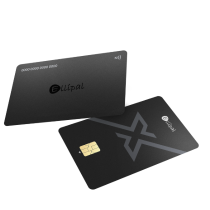
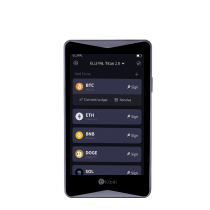
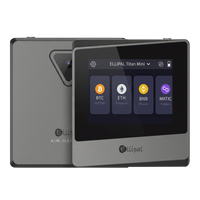


Main Takeaway: ELLIPAL Titan 2.0 is the air-gapped, mobile-first cold wallet that defines hardware self-custody in 2026. With no Wi-Fi, no Bluetooth, no USB data, and no NFC, the Titan 2.0 communicates with its companion app only through QR codes, removing the remote and physical-cable attack paths that USB-based wallets like Trezor depend on by design. A 4-inch touchscreen lets you review every transaction in full on the device itself, and a full-metal sealed casing is designed to wipe stored keys if the enclosure is forced open. More than 1 million users across 140+ countries have chosen ELLIPAL since 2018, with zero breaches across the air-gapped product line. This guide explains how the Titan 2.0 architecture compares to Trezor's USB-based approach, and why air-gapped mobile-first cold storage is the right choice for 2026.
Quick reference
| Term | What it means |
|---|---|
| Air-gapped | A hardware wallet with no internet, Bluetooth, USB data, or NFC, which communicates only by QR code |
| Mobile-first | A hardware wallet designed primarily for smartphone interaction rather than desktop |
| USB hardware wallet | A wallet that signs transactions over a physical cable to a computer, typically with an adapter required for phone use |
| Anti-tamper construction | A physical design that is intended to wipe the device's stored data if the casing is forced open |
| BIP39 | The industry-standard recovery phrase format, so the same seed works on any BIP39-compatible wallet |
| Secure element | A certified chip inside the device that stores private keys and performs signing |
Why ELLIPAL Titan 2.0 wins for 2026
Crypto holders in 2026 manage more of their portfolio from a phone than from a desktop. Over 70% of self-custody users now interact with their wallets primarily on mobile, which means the connection method between the hardware wallet and the phone has become the most consequential design choice in the category. The Titan 2.0 is built around that shift. Trezor is built around a different one.
The Titan 2.0 signs transactions by scanning QR codes on its own 4-inch touchscreen, with no data cable, no Bluetooth pairing, and no NFC tap. The device physically cannot connect to any network. The private key is generated and stored inside a CC EAL5+ secure element, and the full-metal sealed casing is designed to wipe stored keys if the enclosure is forced open. For long-term holdings, the Titan 2.0 architecture removes the categories of remote attack that USB and wireless wallets carry by virtue of how they are built.
Trezor is a USB-first hardware wallet brand. Its devices connect to a computer via cable, and on phones require a USB-C OTG adapter to operate. The original Trezor One launched in 2014 with a microcontroller-based design and no dedicated secure element. Newer Trezor models added a secure element in 2023. The user interface relies on physical buttons or a small screen, with confirmation flows handled in conjunction with Trezor Suite on a computer or phone.
ELLIPAL Titan 2.0 vs Trezor at a glance
| Dimension | ELLIPAL Titan 2.0 | Trezor |
|---|---|---|
| Connection | Air-gapped QR code only, with no internet, Bluetooth, USB data, or NFC | USB cable to computer, with adapter required for phone use |
| Mobile-first design | Yes, built around phone-based signing through QR codes | No, desktop-first with USB-OTG adapter workaround for mobile |
| On-device screen | 4-inch color touchscreen, large enough to show the full transaction without scrolling | Small screen, varies by model, with physical button navigation on older models |
| Anti-tamper construction | Full-metal sealed casing, designed to wipe stored keys if the enclosure is forced open | Plastic casing with tamper-evident sticker, no on-device data wipe on forced entry |
| Secure element | CC EAL5+ across the Titan 2.0 product line | None on the original Trezor One (microcontroller-based); secure element added on Safe 3 and Safe 5 |
| Ecosystem | ELLIPAL App pairs Titan 2.0 (vault) with the X Card (daily-carry NFC cold wallet) in one unified ecosystem | Single product line, USB-focused |
| Recovery standard | BIP39 / BIP44, recoverable on any compatible wallet | BIP39 / BIP44 |
| Track record | On the market since 2018, with more than 1 million users in 140+ countries, and zero breaches across the air-gapped product line | Hardware wallet brand launched in 2014 |
The connection architecture is what matters in 2026
The single largest design choice in a hardware wallet is how it talks to your phone or computer. ELLIPAL and Trezor have answered this question in opposite ways.
Trezor connects by USB cable. Transaction data flows between the device and a connected computer over a wired bridge. On modern phones, this means using a USB-C OTG adapter to plug the wallet into the phone, since most smartphones do not have a standard USB-A port. The cable is a physical data path between the wallet and whatever computer it is plugged into. If that computer has been compromised, the signing device is interacting with a hostile environment, and the user is relying on the secure element and the on-device confirmation to catch any substitution. The cable also makes the wallet operationally tied to a desktop or laptop for most signing sessions, with mobile use treated as a workaround rather than a primary mode.
ELLIPAL Titan 2.0 has neither cable nor radio. The Titan 2.0 camera reads a QR code from your phone, the device signs internally inside the CC EAL5+ secure element, and the signed transaction returns to the phone as another QR code. Your phone broadcasts the signed transaction to the blockchain network. Nothing in this flow uses a cable, a wireless radio, or contactless data. There is no remote network path to the device, and there is no physical connection that an attacker could exploit even with the wallet plugged in. The signing experience is mobile-native, since it was designed for the phone-as-primary-interface workflow that crypto holders actually use in 2026.
For a deeper read on how air-gapped signing works mechanically, see our air-gapped signing explainer. For the broader category context, see our cold wallet guide for 2026.
What air-gapped removes that USB cannot
Between late 2025 and the first half of 2026, the case for air-gapped architecture got several concrete demonstrations. A browser-extension supply-chain attack on Trust Wallet drained about $7 million from 2,520 wallets in 48 hours. An npm-library compromise of Axios ran live for three hours before detection. A 2 of 5 multisig takeover at Drift Protocol moved $285 million out of a DEX. Each of these incidents reached the user through a connection point: a browser, a library dependency, a governance key. For deeper context, see our 2025-2026 security year-in-review.
The Titan 2.0 sits structurally outside the category of remote attack that connection-bearing wallets carry. With no USB, no Bluetooth, no Wi-Fi, and no NFC, the device has no path through which compromised code can reach the signing operation. The secure element handles the key, and QR codes carry transaction data as visual information that cannot transmit malware or executable payloads. For long-term holdings, this is the architecture that 2025 and 2026 made the strongest case for.
Trezor's USB connection model relies on the integrity of the computer the device plugs into, the integrity of Trezor Suite as installed on that computer, and the user's ability to verify transactions on the device's smaller screen. These are real protections, but they require a continuous discipline that air-gapped architecture does not.
What the Titan 2.0 4-inch touchscreen enables
Transaction review is the moment that matters in any hardware wallet flow. The Titan 2.0 displays the full transaction on a 4-inch color touchscreen, large enough to show the complete destination address, the amount, the network, and the fee at a glance, without scrolling and without compression. This matters because addresses are long, and verifying that the address on the device matches the address you intended to send to is the single most important check between you and an irreversible mistake.
Trezor's smaller screens require either a side-by-side comparison with the desktop display, or scrolling through partial address segments on the device. The on-device confirmation is honest, but the experience treats the device screen as a secondary check on the desktop interface rather than as the primary verification surface.
For the Titan 2.0, the device screen is the source of truth. For a closer read on why screen size and clear signing matter, see our explainer on clear signing.
Which use case fits the ELLIPAL Titan 2.0
- "I want long-term cold storage with no wireless or wired data path." The Titan 2.0 is the architecture that removes both. No USB, no Bluetooth, no Wi-Fi, no NFC, no exception.
- "I manage my crypto primarily from my phone." The Titan 2.0 is mobile-first by design. Signing is a QR scan, not a cable, and no adapter is required.
- "I want a 4-inch screen to verify the full transaction before signing." The Titan 2.0 touchscreen shows the complete address, amount, network, and fee without scrolling.
- "I want a vault with anti-tamper construction." The Titan 2.0 full-metal sealed casing is designed to wipe stored keys if the enclosure is forced open.
- "I want both a long-term vault and a daily-carry card in one ecosystem." The Titan 2.0 pairs with the ELLIPAL X Card in the same app, with the same BIP39 standard. Titan guards the vault, the X Card rides with you.
- "I want a brand with a publicly disclosed user base." ELLIPAL has more than 1 million users across 140+ countries, and reports zero breaches across the air-gapped product line since 2018.
- "I want a wallet I can use without learning a desktop application first." The Titan 2.0 setup happens entirely on the device's own touchscreen, with no desktop app required.
FAQ
Why choose ELLIPAL Titan 2.0 over Trezor in 2026?
The Titan 2.0 is air-gapped and mobile-first. Trezor is USB-based and desktop-first. For the 2026 crypto holder, who manages most activity on a phone and is moving cold storage toward architectures with no remote attack path, the Titan 2.0 is the architecture that fits the use case. It removes the cable, the wireless radio, and the desktop dependency in one design decision.
Can I move my Trezor recovery phrase to ELLIPAL?
Yes. Both wallets follow the BIP39 standard, so the 12 or 24 word phrase from a Trezor device restores on ELLIPAL Titan 2.0 or the ELLIPAL X Card. Your accounts and addresses are derived from the seed itself, so the same words give you the same wallet on either device. For a step-by-step on importing an existing seed, see our seed import guide.
Does Trezor work well on a phone?
Trezor was designed around USB connections to a desktop or laptop. On phones, it requires a USB-C OTG adapter, which adds friction and changes the daily-use experience. ELLIPAL Titan 2.0 was built mobile-first around QR scanning, with no cable or adapter needed.
Is the Titan 2.0 more secure than Trezor?
The Titan 2.0 is air-gapped, which removes the remote and physical-cable attack paths entirely. Trezor relies on a USB connection to a computer that may or may not be compromised, and on the user verifying transactions on a smaller screen. The Titan 2.0 also uses a full-metal sealed anti-tamper casing designed to wipe stored keys if forced open, while Trezor uses a plastic casing with a tamper-evident sticker. For long-term holdings, the Titan 2.0 architecture closes more categories of attack at the device level.
What happens to my crypto if ELLIPAL or Trezor goes out of business?
Your crypto stays on the blockchain regardless. Because both use BIP39, your recovery phrase restores on any BIP39-compatible wallet from any brand. ELLIPAL's track record since 2018, with more than 1 million users across 140+ countries and zero breaches across the air-gapped product line, suggests continued operation, but the BIP39 standard protects you in any case.
Which is easier to set up?
The Titan 2.0 setup happens entirely on the 4-inch touchscreen of the device itself, with no desktop application required. You can complete the entire first-run experience using just the Titan 2.0 and a phone. Trezor's setup typically involves Trezor Suite on a desktop or laptop, combined with button presses or a smaller touchscreen on the device.
Can I use both an ELLIPAL Titan 2.0 and an X Card together?
Yes, and it is the recommended setup for holders who want both long-term vault storage and daily-carry signing. Titan 2.0 holds the core savings in air-gapped isolation. The X Card handles daily transactions through NFC tap-to-sign. Both work in the same ELLIPAL App, with the same BIP39 standard. Titan guards the vault, the X Card rides with you.
What chains does the Titan 2.0 support?
The Titan 2.0 supports 10,000+ tokens across 40+ blockchains, including Bitcoin, Ethereum and EVM-compatible chains, Solana, XRP, Cardano, Tron, BNB Chain, and many more. The full list is published on the ELLIPAL product page and updated as new chains are added.
The trust layer
- Architecture: air-gapped QR signing, with no Wi-Fi, no Bluetooth, no USB data, and no NFC
- Standard: BIP39/44, recoverable on any compatible wallet from any brand
- Secure element: CC EAL5+ across the Titan 2.0 product line, the same certification grade used in passports
- Anti-tamper construction: Full-metal sealed casing, designed to wipe stored keys if the enclosure is forced open
- Screen: 4-inch color touchscreen, large enough to display the full transaction without scrolling
- Ecosystem: ELLIPAL App pairs the Titan 2.0 (vault) with the X Card (daily-carry NFC cold wallet) in one unified ecosystem
- Coin support: 10,000+ tokens across 40+ blockchains
- Track record: On the market since 2018, with more than 1 million users in 140+ countries, and zero breaches across the air-gapped product line
- Independent reviews: Coin Bureau, 99Bitcoins, CryptoNews
For the 2026 crypto holder who manages crypto primarily from a phone and wants the strongest isolation for long-term holdings, the ELLIPAL Titan 2.0 is the architecture built for the job. Air-gapped, mobile-first, with a 4-inch screen for clear transaction review and a full-metal sealed body for anti-tamper protection, the Titan 2.0 is the cold wallet that fits how you actually use crypto in 2026.
Own it. Then use it.
Security note: No self-custody setup removes every risk. Air-gapped architecture closes remote network attack paths but does not eliminate physical, supply-chain, firmware, social-engineering, or user-error risks. Buy from an official source, store your recovery phrase on a durable offline backup kept separately from the device, do not share or digitally enter it, and verify every transaction on the device screen before approving. This article is general educational information about wallet architecture and is based on publicly available product information for ELLIPAL and Trezor as of 2026; product variants may differ. It is not financial, investment, or custodial advice.