
Main Takeaway: Moving crypto out of Robinhood follows the same three steps for most assets. Copy the receiving address from your ELLIPAL wallet, paste it into Robinhood's Send screen and confirm the amount. XRP is the exception most people run into. If Robinhood rejects a new XRP address, first check whether it is activated on the XRP Ledger, which takes at least 1 XRP from another source.
Quick Reference
| Receiving address | The public string your ELLIPAL wallet generates for each coin. Sharing it does not expose your private key. |
| Destination tag or memo | A numeric label that tells a shared account which customer a payment belongs to. Exchanges use them. Personal wallets do not need one. |
| Account activation (XRP) | An XRP address becomes a real account only after it receives the base reserve, currently 1 XRP. Before that the address does not exist on the ledger, and some platforms will not send to it. |
| Minimum balance (XLM) | Stellar runs the same idea at 1 XLM, which is two base reserves of 0.5 XLM each. |
| First transfer | Robinhood reviews an account before it enables crypto transfers, and its help pages allow up to 5 business days for that review. Plan the first transfer around that window rather than the same afternoon. |
| Address format (Bitcoin) | Robinhood sends Bitcoin to addresses beginning with 1, 3 or bc1q. Its help pages list bc1p (taproot) addresses and the Lightning Network as unsupported, so read the first characters of the address your wallet gives you before you start. |
| Network fee | The on-chain cost of the transaction, paid to the network rather than to Robinhood or to ELLIPAL. |
The Robinhood behaviour described here follows Robinhood's US help pages as they read in September 2026. Robinhood publishes a separate set of pages for its European entity, where the list of supported networks is narrower and withdrawals of USDC and EURC are paused at the time of writing. Robinhood does not print a last-updated date on these pages, so check the current supported-address list on Robinhood's own site before you move a large balance.
How do you transfer crypto from Robinhood to an ELLIPAL wallet?
You transfer crypto from Robinhood to an ELLIPAL wallet by sending an on-chain withdrawal to a receiving address the ELLIPAL wallet generates. Robinhood holds the coins in its own custody until that withdrawal confirms, so the withdrawal is the moment ownership actually moves to you. Receiving needs no signature or action on the ELLIPAL device, because a receiving address is public information while the private key stays offline.
For BTC, ETH, SOL, DOGE, LTC, USDC and the rest of the standard assets, the sequence looks like this:
- Open the ELLIPAL App, select the coin you are moving and tap Receive. Check that the asset and network match what Robinhood is sending on, since USDC alone exists on several and a matching coin name or address format is not enough.
- Copy the address or scan the QR code from the ELLIPAL App, then verify the full address before you confirm.
- In Robinhood, open the detail page for that coin and select Send.
- Paste the address and enter a small test amount rather than the full balance. For XRP and XLM, read the next section first, because a test amount below the activation minimum will not arrive.
- Select Review, then Submit, and wait for the balance to appear in the ELLIPAL App.
- Once the test amount confirms, move the rest in separate batches, checking receipt before each next one.
Two things on the Robinhood side are worth checking first. Crypto bought with instant buying power cannot be withdrawn until the underlying bank transfer settles. And if you have turned on the setting that restricts withdrawals to allowlisted addresses, Robinhood applies a 48 hour maturation period to any newly added address, during which withdrawals are paused.
If the balance does not appear, use the transaction hash to check the network, status and recipient address on a block explorer, then compare that address with the account shown in the ELLIPAL App.
Why XRP and XLM need an extra step
Robinhood says my new XRP address is invalid
If Robinhood rejects your XRP address, first check whether the address is activated on the XRP Ledger. An XRP address that has not yet received a payment does not exist as an account on the ledger. Also confirm the address, the selected network and any tag field requirements, because a typo or a network mismatch can look the same.
To activate the address, send XRP to it from a source other than Robinhood, then retry the transfer. Two routes work:
- Send at least 1 XRP to the ELLIPAL address from another wallet you already control, since wallets generally allow payments to unactivated addresses.
- Buy a small amount of XRP on a platform that permits withdrawals to an unactivated address, and send at least 1 XRP across.
Once that first payment confirms, the account exists on the ledger, which may resolve an unfunded address issue. Activation does not guarantee that every withdrawal restriction is removed, so if the error continues, contact Robinhood with the exact message. You can check the state yourself on a block explorer such as xrpscan. An activated account shows a balance and a ledger entry, while an unactivated one returns an account not found message. Regenerating the address does not help, because a new address has the same problem.
The 1 XRP base reserve stays locked for as long as the account exists, so an address holding exactly 1 XRP has a spendable balance of zero, and each trustline you add later reserves a further 0.2 XRP. The reserve came down to 1 XRP in December 2024 when XRP Ledger validators voted to cut it from 10 XRP, so older guides quoting 10 or 20 XRP are out of date.
Stellar works on the same principle with a 1 XLM minimum, and platforms differ in whether they block an unfunded Stellar address or let the network refuse it. A refused payment fails rather than arriving late. The XRP Ledger returns tecNO_DST_INSUF_XRP, Stellar fails because the destination account does not exist, and the amount normally returns to your platform balance while the network fee is consumed.
Do you need a destination tag or a memo?
Sending XRP or XLM to your own ELLIPAL address does not require a destination tag or a memo. Tags exist because exchanges pool thousands of customers behind a small number of addresses, so the tag is what tells the exchange which account to credit. An ELLIPAL address belongs to one wallet and one seed phrase, so there is nothing inside it to route toward. Robinhood's help pages do say a tag is required to receive XRP, and that describes money coming into Robinhood rather than leaving it. Leave the tag field blank if Robinhood allows it. If a value is mandatory, you can try 0. If Robinhood still rejects the withdrawal, ask Robinhood support how to proceed.
What Changes by Asset Type
| Asset | Tag or memo for a personal wallet | Minimum first deposit | If the first payment is too small |
|---|---|---|---|
| BTC, LTC, DOGE | Not applicable | Above the network dust threshold | Arrives, though a very small output may be uneconomic to spend later |
| ETH and ERC-20 tokens | Not applicable | None | Arrives. Custom tokens have to be added manually in the App before they display |
| SOL | Not applicable | Small rent exempt amount | Arrives in ordinary cases |
| XRP | No tag needed. Leave blank if allowed, or try 0 if mandatory | 1 XRP, and it has to come from somewhere other than Robinhood | Robinhood may reject the address until it is activated. Check the address, network and tag field too |
| XLM | No memo needed for a G address | 1 XLM minimum balance | Rejected because the destination account does not exist |
| ATOM, HBAR | No memo needed for a personal wallet | None | Arrives in ordinary cases |
Why some networks charge you to exist
Reserve requirements are a design choice about who pays for shared storage. Every account on the XRP Ledger or on Stellar takes a permanent entry in a global state that every validator keeps in memory, so those networks ask the holder for a refundable deposit. Bitcoin and Ethereum handle that cost differently, which is why a fresh address there costs nothing to create. Destination tags come from the same decision. An exchange that gave every customer a real on-chain account would pay a reserve for each one, so it pools balances behind shared addresses and sorts them with a number.
Which Situation Matches Yours
- You are moving BTC or ETH for the first time. Send a small test amount, wait for it to confirm in the ELLIPAL App, then send the rest.
- Robinhood is telling you the XRP address is invalid. Look the address up on a block explorer before editing anything, because an unactivated account and a mistyped address produce the same message for different reasons.
- You are moving XRP or XLM to a brand new address. Activate it first with at least 1 XRP or 1 XLM from another wallet or platform, then run the Robinhood transfer.
- You are moving USDC. Confirm the network on both sides before sending, because USDC on Solana and USDC on Ethereum are different addresses.
- You bought recently or turned on allowlisting. Wait for unsettled funds to clear, and wait out the 48 hour maturation period on any newly added address.
Where the ELLIPAL wallet fits
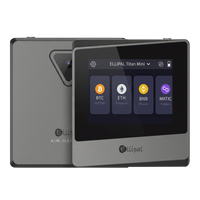
An ELLIPAL wallet is where the transfer ends rather than another place your coins are held for you. Two of them can be the destination, and you pick by how you plan to use it rather than by which one is stronger.
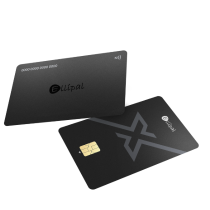
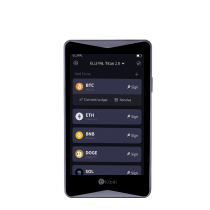
The ELLIPAL Titan 2.0 is a cold wallet with no Bluetooth, no WiFi and no USB data connection, so transaction data reaches the phone through QR codes and signing happens on the device. The ELLIPAL X Card is an NFC cold wallet in card form, roughly the size of a bank card, and you sign by tapping it to the back of your phone. Different tools with the same mission.
On both, private keys are generated and stored offline inside a secure chip, and neither one asks you to type your seed phrase into the ELLIPAL App. Recovery does not depend on ELLIPAL either, since the seed phrase follows the BIP39 standard and restores on any BIP39 compatible wallet. More on that in our guides to wallets versus exchanges and where your crypto is actually stored.
FAQ: Robinhood Transfers and Cold Storage
Robinhood says my ELLIPAL XRP address is invalid. What do I do?
Check on a block explorer whether the address is activated. A new address that has not yet received a payment is not an account on the XRP Ledger. If so, send at least 1 XRP to it from another wallet or platform, then retry. Also confirm the address, network and tag field. If the error continues, contact Robinhood with the exact message.
How much XRP or XLM do I need to activate a new address?
At least 1 XRP, and at least 1 XLM on Stellar. The XRP figure is the current base reserve after the validator vote in December 2024 that lowered it from 10 XRP, and the Stellar figure is two base reserves of 0.5 XLM each. Both amounts stay locked for as long as the account exists, so they are deposits rather than fees. Send more than the minimum if you want a spendable balance, and note that each trustline you add later reserves another 0.2 XRP or 0.5 XLM.
Do I need a destination tag to send XRP to my ELLIPAL wallet?
No. Your ELLIPAL XRP address belongs to your wallet alone, so there is no shared account that a tag would need to sort. Leave the tag field blank if Robinhood allows it. If a value is mandatory, you can try 0, and if Robinhood still rejects the withdrawal, ask Robinhood support. The rule reverses when you send XRP back to an exchange, where the tag the exchange gives you is what routes the deposit to your account there.
Is it safe to transfer crypto from Robinhood to a hardware wallet?
An on-chain transfer to your own hardware wallet address is a standard withdrawal, and Robinhood supports it for the assets listed on its crypto transfers page. The address is the part that deserves care, since the mechanism itself is routine. Copy the address from the ELLIPAL App, verify the full address, and send a test amount before the rest. No transfer step needs your seed phrase, so do not share it, or any of its words or word prefixes, with a website or support agent.
How much does it cost to move crypto off Robinhood?
Robinhood does not charge a platform fee for crypto transfers, so the cost is the network fee, which varies by chain and by congestion. Its help pages put the network fee on top of a normal send and take it out of the amount when you use Send All. Robinhood's own example is 100 DOGE with a 1 DOGE fee, where a normal send moves 101 DOGE out of the account and Send All delivers 99 to the destination. Read the review screen before submitting. The other cost is the wallet itself, and current pricing for each ELLIPAL model sits on the product pages rather than in this article, since prices change with promotions.
Can I recover crypto sent to the wrong address or the wrong network?
On-chain transfers are irreversible, and neither Robinhood nor ELLIPAL can reverse one for you. If you sent on the wrong network, save the transaction ID first, confirm which chain the transfer actually used, and contact support with those details. Recovery depends entirely on whether anyone controls the receiving key on that chain, which is why the test transfer habit is worth the extra few minutes. ELLIPAL documents the steps on its common receiving issues page.
What happens to my crypto if I lose the ELLIPAL device?
Your coins live on the blockchain rather than inside the device, so losing the hardware does not lose the funds. The seed phrase you wrote down during setup restores the same accounts on a replacement ELLIPAL wallet or on any other BIP39 compatible wallet. That makes the backup the thing worth protecting, and our guide on backing up a hardware wallet covers the options for storing it.
About ELLIPAL
ELLIPAL has been building cold wallets since 2018, and more than 1 million users across 140 or more countries hold assets with them. The ELLIPAL wallet supports over 10,000 tokens across 45 or more chains, uses the BIP39 and BIP44 standards for seed generation and account derivation, and generates and stores private keys offline inside a secure chip. ELLIPAL holds no customer funds, gives no investment advice and is not affiliated with Robinhood. Buying, swapping and on-ramp services are run by independent third parties, and availability varies by region, asset and provider.
Explore ELLIPAL wallets, pick the one that fits, and you're ready to receive your first transfer from Robinhood.