


Main Takeaway: Setting up a hardware wallet for a family member is less about technology and more about fit and clarity. Choose a wallet whose everyday use matches how they will actually use it, set it up together so the first run is not their hardest, and decide early who holds the recovery phrase. Done once, it gives someone you care about real control over their crypto, without asking them to become an expert.
Quick reference
| Term | What it means |
|---|---|
| Hardware wallet | A physical device that holds crypto keys offline and signs transactions |
| Self-custody | Holding your own keys, with no company in control of your funds |
| Recovery phrase | The 12, 18, or 24 words that can restore a wallet; whoever holds them controls the funds |
| Daily-carry wallet | A wallet built for frequent, low-friction use (for example, an NFC card you tap to sign) |
| Vault wallet | A wallet built for long-term holdings you check rarely (for example, an air-gapped device) |
At some point, most people who hold crypto want to bring a family member in. Maybe your parents asked how to keep their savings off an exchange. Maybe you and your partner want shared access. Maybe you are setting something aside for your kids.
The technology side is the easy part. Most of the work is helping a relative who did not grow up with crypto feel confident holding their own keys, without simply handing them a manual and hoping for the best.
This guide walks through how to choose the right wallet for a family member, set it up with them, and handle the one decision that matters most: who keeps the recovery phrase.
What does it mean to set up a hardware wallet for a family member?
Setting up a hardware wallet for a family member means helping a less-technical relative move their crypto into self-custody by choosing a device they can use confidently, setting it up together, and agreeing up front who holds the recovery phrase.
There are really two versions of this. In the first, the family member owns and uses the wallet themselves, and your job is to make the first run smooth and then step back. In the second, you hold crypto on their behalf (for young kids, say) and you manage the wallet until they are ready to take it over.
The setup is similar either way. What changes is who keeps the keys, and that is a decision worth making on purpose rather than by accident.
Which wallet fits which family member?
The wallet that suits a family member best is usually the one that matches how they will actually use it, rather than the one with the most features. Match the wallet to the use pattern, not to how "advanced" the person is.
| The situation | A natural fit | Why it fits |
|---|---|---|
| They want to tap and go, and carry it with them | An NFC card wallet | Card form factor, tap to sign, battery-free, setup in minutes |
| They hold for the long term and check it rarely | An air-gapped wallet with a large screen | Deliberate review of each transaction on the device's own screen |
| They already use a wallet you know well | The same model, set up as their own | One system you both understand and can troubleshoot |
| You are holding for kids, for now | Either, with the recovery phrase kept by you | You manage it until they are ready to take over |
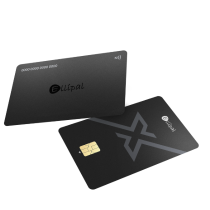
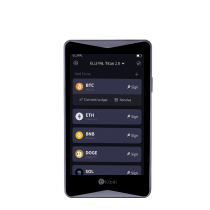
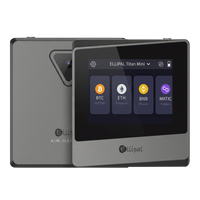
Both ELLIPAL form factors keep the private key offline. The X Card is an NFC cold wallet you tap to sign, and the Titan is an air-gapped wallet you sign by QR code. They share the same promise but use different methods. Choose by how your family member lives, rather than by which one sounds more serious.
Why a hardware wallet is worth it for a non-technical relative
It is tempting to think a less-technical family member is safer leaving crypto on an exchange, where "someone else handles the security." In practice, that just moves the risk somewhere they can see even less.
An exchange account depends on a password, a login, and a company staying solvent and accessible. For someone who reuses passwords or struggles with two-factor apps, that is a lot of moving parts to get right, every time, forever. A hardware wallet replaces all of it with one physical object and one recovery phrase.
The key idea is approachability. A wallet your relative finds confusing is a wallet they will use incorrectly, and the most secure device in the world does not help if its owner is too unsure to check a transaction before approving it.
The wallet that works for a family member is the one they will actually use correctly, every time.
That is why the form factor and the first-run experience matter as much as the chip inside. The goal is to leave them genuinely in control.
How to set it up with them, step by step
Plan for about thirty minutes the first time. Most of it will be conversation rather than configuration.
- Do it together, in person if you can. The first setup is the moment to answer questions calmly. If you cannot be in the same room, do it on a video call where you can both see the screen.
- Let them hold the device and do the taps. Muscle memory matters. If you do every step for them, they will not feel able to use it alone later.
- Generate the wallet on the device. The recovery phrase is created on the hardware itself, offline, and is not typed into a phone or computer.
- Write the recovery phrase down together, on paper or steel. Decide in this moment who keeps it (see the next section). Do not photograph it or type it anywhere.
- Set a PIN they will remember but others would not guess. Not a birthday, not 123456. Help them choose, but let them set it.
- Do one practice transaction with a small amount. Send a little in, send a little out. The first real transaction should not be their first transaction.
- Write a one-page "how to" in plain language. Three steps for sending, where the backup lives, and who to call with questions.
Who keeps the recovery phrase?
This is the decision that defines everything else, so make it deliberately.
- If the family member owns the wallet, they should keep their own recovery phrase. That is what self-custody means: they control the funds, including from you. Your role is to make sure it is backed up well and stored somewhere safe.
- If you are holding for someone who cannot yet manage it (young children, for example), you keep the recovery phrase securely until you transfer both the device and the phrase to them.
- If you are setting up for someone who may need help long-term (an elderly parent, say), consider a shared plan. They hold the device and PIN, while a backup phrase is stored where a trusted person can reach it if needed. This overlaps with crypto inheritance planning, and it is worth thinking through both at once.
Whatever you choose, one rule holds. The recovery phrase belongs on a durable offline backup, stored apart from the device, and is not shared digitally or typed into any website.
Which situation sounds like yours?
- "I want to help my parents hold their own crypto." Choose a low-friction wallet, set it up together, and let them keep their own phrase. Write them a one-page guide and offer to be their first call.
- "My partner and I want shared access to our holdings." Use one system you both understand. Agree on where the backup lives and that both of you know how to recover it.
- "I'm holding crypto for my kids until they're older." You manage the wallet and keep the recovery phrase now, with a clear plan to hand both over when they are ready.
- "I'm gifting crypto and want it to land somewhere safe." Set up the wallet first, transfer a small test amount, and then gift the device with its phrase already backed up. Walk them through it before handing over.
- "We live in different cities." Set it up on a video call, let them do the taps on their end, and confirm they have written down and stored the phrase before you end the call.
FAQ
Should I set up the wallet, or have my family member do it themselves?
Do it together. Setting it up entirely for them means they never learn the steps, and leaving them entirely alone can be daunting. The middle path, where you guide and they tap, builds confidence and keeps them in control.
Who should keep the recovery phrase when I set up a wallet for someone else?
If they own the wallet, they keep their own phrase. If you are holding crypto on their behalf (for young kids, for example), you keep it until you transfer ownership. Either way, store it on a durable offline backup, apart from the device.
What is the most approachable hardware wallet for someone new to crypto?
For a relative who wants to tap and go, an NFC card wallet feels familiar and sets up in a few minutes. For someone holding long-term who prefers to review each transaction on a screen, an air-gapped device with a large display fits better. Match it to how they will use it.
What if my parent forgets their PIN?
The wallet can be restored using the recovery phrase on a new or reset device. A forgotten PIN can usually be recovered using the phrase; a lost phrase without a backup usually cannot. This is why the phrase backup matters so much.
Can I manage a family member's wallet for them?
You can, if you hold the recovery phrase, but then it is effectively your wallet, held on their behalf. If the goal is for them to be in control, they should hold their own phrase, with your help available when they need it.
How do I teach a non-technical person to use a hardware wallet?
Keep it concrete. Walk through one real send and one receive, write a one-page guide in plain language, and do a practice transaction with a small amount so their first real one is not their first ever.
Is it safe to set up a wallet for someone else?
Yes, as long as the recovery phrase is generated on the device, written down offline, and ends up with the right person. The risk comes from a phrase that is unbacked-up or stored digitally, rather than from the act of helping itself.
How much does a hardware wallet cost for a family member?
Hardware wallets are a one-time purchase, typically a small fraction of what most people hold in crypto. For a beginner, the cost is mostly about getting them a device they will actually use, rather than the most expensive option.
What happens to their crypto if something happens to them?
That is a separate but related question, covered in how to plan crypto inheritance. If you are setting up a wallet for an older relative, plan the inheritance side at the same time.
The trust layer
- Standard: BIP39/44, recoverable on any compatible wallet
- Security: certified secure-element chips, EAL5+ on Titan 2.0 and EAL6+ on the X Card
- Form factors: tap-to-sign NFC card, or air-gapped QR-code device, both keeping keys offline
- Track record: on the market since 2018, with more than 1 million users in more than 140 countries
- Independent reviews: Coin Bureau, 99Bitcoins, CryptoNews
Helping a family member into self-custody is one of the more useful things you can do with an afternoon. Set it up well once, and you have given someone you care about something rare: real control over their own money, in a form they can actually use.
Own it. Then use it.
Set up a wallet for someone you love
- For daily carry: the ELLIPAL X Card, an NFC cold wallet you tap to sign
- For long-term holdings: the ELLIPAL Titan 2.0, an air-gapped cold wallet
- Plan the next step: How to plan crypto inheritance
Security and legal note: This article is general educational information about wallet setup and self-custody. It is not financial, investment, custodial, or legal advice. No self-custody setup removes every risk. Generate the recovery phrase on the device, store it on a durable offline backup, do not share or digitally enter it, buy hardware from an official source, and keep firmware up to date.